Hand Drawn Celestial Birth Month Flowers: Integrating Art into Creative Workflows
In creative and commercial workflows, sourcing cohesive, high-quality assets is often a pivotal stage. The discovery of a versatile collection can shift a project's trajectory, streamlining production and elevating final results. The Hand Drawn Celestial Birth Month Flowers collection represents such an asset, merging botanical art with celestial motifs to provide a foundational graphic toolkit. Understanding how to effectively implement these files within professional and personal processes is key to unlocking their full potential.
The Role of a Unified Asset Collection in Project Planning
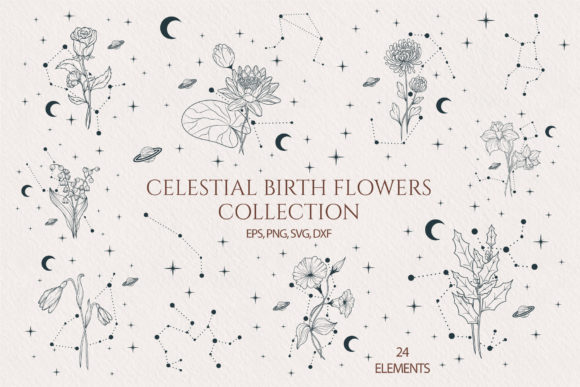
Before diving into design execution, the planning phase involves defining themes, sourcing elements, and ensuring asset compatibility. A collection like Hand Drawn Celestial Birth Month Flowers addresses these needs directly. It provides a pre-curated set of symbols—the Snow Drop for January, Violet for February, Daffodil for March, and so on through Holly Berry for December—each paired with its corresponding constellation. This thematic unity means you aren't sourcing disparate flower illustrations and star graphics separately, saving considerable time in the initial research and aggregation stage.
For a project manager or designer planning a year-long campaign, a branding suite for a botanical shop, or personalized monthly content, this collection offers a ready-made visual calendar. The practical step here is to assess the project scope against the provided file formats. The inclusion of SVG, DXF, EPS, and PNG files means the assets are prepared for both digital design environments and physical fabrication processes, a crucial factor in planning for multi-channel output.
Integration into Digital Design and Print Production Workflows
The core utility of the Hand Drawn Celestial Birth Month Flowers artwork manifests during the active design and production phase. Here, the vector file formats (SVG and EPS) become central. In software like Adobe Illustrator, Affinity Designer, or even within browser-based design tools, these scalable vectors allow for seamless manipulation. You can resize elements for a poster or shrink them for a business card icon without quality loss, maintaining consistency across various media.
A key integration point is with cutting machine software, such as for Silhouette or Cricut. The provided DXF files are specifically formatted for this hardware, bridging digital design with physical craft. In a workflow, this might mean designing a greeting card layout in a vector program using the SVG files, then exporting or using the corresponding DXF to send to the cutting machine for producing intricate paper layers or vinyl decals. This seamless transition from screen to material is a significant efficiency gain, eliminating the need for file conversion or redrawing.
Adapting Assets for Brand Identity and Stationery Systems
For entrepreneurs and small business owners developing their identity, consistency is paramount. The hand drawn style of the Celestial Birth Month Flowers offers a distinctive yet adaptable aesthetic. The workflow involves selecting primary and secondary motifs from the monthly set that align with the brand’s story—perhaps the Cosmos for an autumn launch or the Rose for a midsummer event. Using the vector files, you can extract floral elements for logo components, modify colors to fit your palette (as noted, colors are easily changed in vector software), and apply them across stationery, invoices, and packaging.
This process ensures all brand touchpoints share a common visual language. The high-resolution PNGs with transparent backgrounds are then ready for immediate use in web design, social media graphics, or digital flyers, supporting the online component of the brand rollout without requiring further editing.
Streamlining Content Creation for Bloggers and Educators
For content creators like bloggers and educators, visual assets drive engagement and aid comprehension. Integrating these floral and celestial illustrations into a content creation pipeline can systematize graphic production. An educator creating monthly astronomy or botany unit plans, for example, can use the corresponding flower and constellation pair as a recurring visual anchor for handouts, presentations, and online modules. The practical tip is to store the organized PNG files in a dedicated project folder, allowing for quick drag-and-drop insertion into presentation software or blog post editors.
Similarly, a lifestyle blogger planning a series on birth month traditions can use the artwork to create a uniform header graphic template for each post. The hand drawn quality adds a personal, artisanal feel that resonates with audiences, differentiating the content from stock photography. The workflow here is about pre-preparation: having the right file (likely the PNG for web use) readily accessible when the writing is complete, smoothing the transition from text to published post.
Enhancing Personal Projects and Craft Production
Beyond professional use, the collection fits naturally into hobbyist and craft-oriented workflows. For someone undertaking scrapbooking, the process might involve first reviewing the JPEG preview file to select motifs, then using the cutting machine files to produce precise paper elements for physical albums. The key is understanding the order of operations: selection, digital setup in cutting software (using the provided DXF), machine calibration, and then physical assembly.
For creating personalized gifts like t-shirts or greeting cards, the workflow integrates design, customization, and production. You might start in a simple vector tool to combine a birth month flower with a recipient's name, using the SVG file. After customizing colors, you could export for screen printing (using the high-res PNG) or, again, use the DXF for a cutting machine to create a heat-transfer vinyl stencil. This exemplifies how a single asset collection can support multiple fabrication methods within a personal project plan.
Long-Term Asset Management and Quality Considerations
A critical, often overlooked phase in asset use is long-term management and quality control. The Hand Drawn Celestial Birth Month Flowers collection, as a digital product, requires proper integration into your file organization system. A practical implementation step is to unzip the archive and immediately categorize the files by format and month. Creating folders named “SVG_Assets,” “PNG_Web,” and “DXF_Cutting” can save hours in future projects when you need a specific file type.
The high quality 300dpi specification for the PNG files ensures they are ready for print scenarios, a detail that prevents quality issues downstream. In a workflow, this means you can confidently use these files for flyers or poster printing without a last-minute resolution check. Similarly, the availability of an EPS vector file, a standard in professional print environments, guarantees compatibility with commercial printing services if your project scales to that level.
Finally, the hand drawn origin of the artwork impacts its uniqueness. In a market saturated with automated vector graphics, these elements carry an organic line quality that can elevate a project's perceived authenticity. When integrating them into your workflow, consider how this handmade characteristic aligns with your project's tone—it may be the deciding factor in choosing this collection over more generic clipart.
By viewing the Hand Drawn Celestial Birth Month Flowers not just as a set of images, but as a multi-format toolkit designed for interoperability across software and hardware, you can embed it smoothly into your creative processes. From initial concept planning through to final digital or physical output, these assets provide a consistent, scalable, and adaptable visual foundation, reducing friction and increasing creative freedom at each stage of your project's execution.