Yellow Roses: A Practical Guide to Elevating Your Designs
In the world of digital design, finding unique, high-quality graphic elements can be a significant challenge. Whether you’re a blogger crafting a standout header, a small business owner designing a shop banner, or a hobbyist working on a personal project, the need for versatile, beautiful assets is universal. Yet, the common hurdles often include sourcing original artwork, ensuring technical compatibility across different software, and maintaining quality at various scales. This is where the concept of Yellow Roses makes its mark. More than just a name, it represents a curated solution: a collection of hand-painted watercolor graphic elements designed to solve these very problems.
Understanding the Yellow Roses Watercolor Bundle
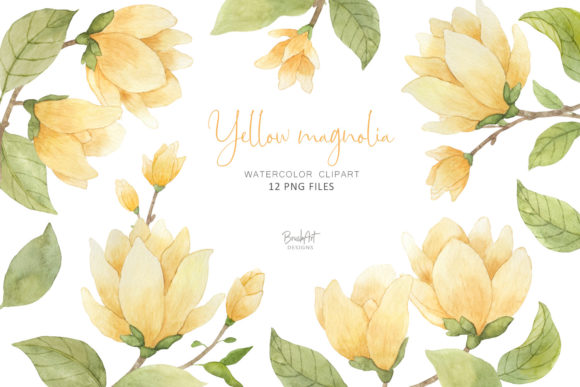
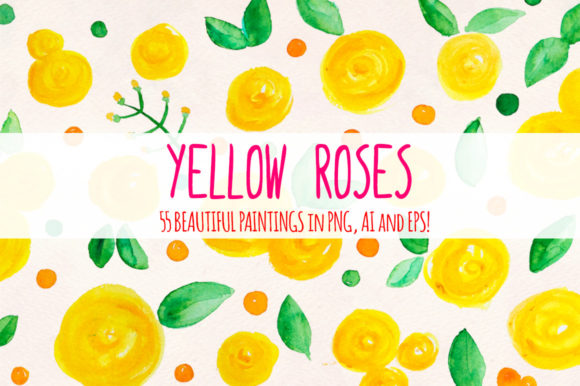
The Yellow Roses graphic element bundle is, at its core, a practical toolkit for creators. It isn’t merely a set of files; it’s a thoughtfully prepared resource born from a traditional artistic process. Each of the 55 floral-themed elements begins as a physical watercolor painting. These paintings are then scanned to capture their authentic texture and color, preserving the organic feel of hand-crafted art. This initial step ensures the uniqueness of every rose, leaf, and botanical detail. To bridge the gap between traditional art and digital usability, these scans are then meticulously converted into vector formats. This process is key: it transforms the beautiful but static painted images into scalable, editable assets without losing their inherent charm.
The Technical Advantages: Solving Format and Scale Challenges
One of the primary frustrations designers face is format limitation. An image perfect for a web banner might pixelate disastrously on a large print poster. The Yellow Roses bundle directly addresses this by offering each element in three distinct file types. The PNG files are the original, high-resolution scans (4416x2788px), perfect for projects where the raw, textured watercolor look is paramount. For projects requiring flawless scaling—like logos or merchandise that needs to be printed at various sizes—the AI and EPS vector files provide a slightly smoothed, infinitely scalable version. This dual approach means you aren’t forced to compromise. You can use the textured PNG for a blog’s atmospheric background and the crisp vector for a repeatable pattern on a product label, all from the same source element.
Practical Applications: Where Yellow Roses Make a Difference
The true value of any resource lies in its application. The Yellow Roses elements are deliberately floral and warm, evoking feelings of growth, welcome, and natural beauty. This thematic choice opens doors to numerous practical uses.
For the blogger or content creator, these elements can transform a generic website template into a branded, inviting space. Imagine using a cluster of yellow roses as a custom divider between posts, or scattering smaller leaf elements as subtle accents in your newsletter header. The organic style adds a personal touch that stock photography often lacks.
For the small business owner, particularly on platforms like Etsy, visual branding is critical. An eye-catching shop banner created with these watercolor elements can immediately communicate craftsmanship and care. The assets can extend to product labels, packaging mock-ups, and social media promotional graphics, creating a cohesive, hand-made aesthetic that resonates with customers.
For the print designer, the vector EPS and AI files are indispensable. Because they are tested in Adobe CS6 and beyond, they integrate smoothly into professional workflows. Designing wedding invitations, stationery, or boutique marketing materials with these elements ensures that the artwork will remain sharp and clear from a business card to a large display sign.
Tailoring Your Approach: Different Users, Different Goals
How you engage with the Yellow Roses bundle will naturally depend on your skill level and project goals.
A beginner or hobbyist might find the PNG files the easiest entry point. These can be simply “dropped into” design projects using basic software or online tools. The average element size—like a flower with two leaves at approximately 558x571px—provides a substantial, ready-to-use graphic without requiring complex editing.
A more advanced designer will leverage the vector AI and EPS files. These allow for deep customization: changing colors, isolating individual leaves, or combining multiple elements into a completely new composition. This flexibility means the bundle isn’t a one-use asset but a foundational component for countless original designs.
Recommendations for Implementation and Best Outcomes
To achieve the best results with Yellow Roses, consider a few practical steps. First, assess your project’s final output. If it’s purely web-based, the high-resolution PNGs will often suffice. If print is involved, or if you need to resize elements frequently, default to the vector files. Second, don’t overlook the power of combination. The bundle contains 55 elements; using them in groups—creating borders, framing text, or building complex floral wreaths—can produce outcomes far more sophisticated than using single elements in isolation.
Finally, let the watercolor aesthetic guide your design’s mood. The Yellow Roses style naturally suits projects related to wellness, creativity, nature, celebration, and warm, welcoming businesses. Aligning your content’s theme with this aesthetic will make the integration feel seamless and intentional.
The Core Benefit: A Foundation of Authentic, Flexible Art
Ultimately, the Yellow Roses watercolor graphic element bundle serves as a bridge. It connects the desire for authentic, human-touched artistry with the practical demands of modern digital design. It solves the specific problems of format rigidity and scaling anxiety while providing a thematic resource that sparks creativity. By offering both the original art scans and their optimized vector counterparts, it empowers users at all levels to improve their projects visually and technically. Whether your goal is to stand out in a crowded online marketplace, add a personal flourish to your blog, or produce professional print materials with a unique touch, this collection provides a tangible, usable path to that goal. It turns the challenge of finding the right graphics into an opportunity for enhanced, beautiful design.